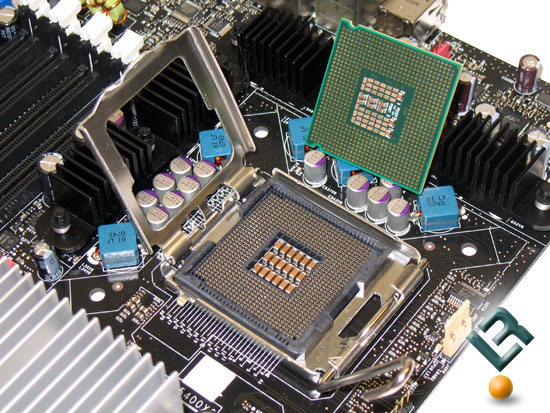
HOW TO - TAKE CARE OF THE MOTHER BOARD OR CPU ?
- Protection By Water : Always Protect The Mother Board or CPU / Desktop Laptop from Water or Moister. (कंप्यूटर और मदर बोर्ड को हमेशा पानी और नमी से बचा कर रखें)
- Never Touch The Main Board : (Motherboard) by Hands, or Never put ant pin or Metal Inside Your System, (Many people try to Change The RAM themselves) so if you are unfamiliar with static charges, never touch The System Board (Mother Board). (मदर बोर्ड और अंदरूनी कलपुर्जों / पार्ट्स को बिना मतलब या नंगे हाथों से न छुएं, लोहे के पिन या नुकीली चीज़ों से मदर बोर्ड या कंप्यूटर के अन्दर छेड़ छाड न करें, बहुत से लोग RAM खुद ही बदलना चाहते हैं - ऐसा करना तब तक बहुत खतरनाक है जब तक आपको इसकी सही जानकारी ना हो, ऐसा करने से मदर बोर्ड या RAM में आग / बर्निंग हो सकती है, और हमारे शारीर का स्थिर चार्ज विधुत परिपथों / बोर्ड को ख़राब कर सकता है)
- In Rainy Season : or even in Fog - always try to keep the system dry, when the system is switch off use a thick cloth over your Desktop Computer, or if you are a Laptop User always insert 4-5 thin tissue papers arround or at the key board of your laptop (only when the laptop is switch off). [बरसात या धुंध में सिस्टम / लैपटॉप को पूर्णतयः शुष्क (सुखा) रखने की कोशिश करें, जब भी कंप्यूटर/ लैपटॉप बंद करें तो मोटे कपडे से उसको ढ़क कर रखें, लैपटॉप के आस पास और के बोर्ड के ऊपर ४ - ५ पतले tissue पेपर रख कर बंद करें]
- In Fog : Same as Point No 3. (धुंध के लिए ऊपर पॉइंट नंबर ३ देखें)
- Keeping All Food Items away from the System / Laptop- they can do short circuit and burning of mother board. [खाने पीने की सभी चीज़ें सिस्टम से दूर रखें, इन वस्तुओं से शोर्ट किर्कुइत हो सकता है].
- Keep The Room Dust Free : and if possible keep it away from dust / storm / rain etc. [जितना संभव हो सके सिस्टम को धुल, मिटटी, तूफ़ान, बरसात आदि से दूर रखें]
- Ventilation : IN DESKTOP - Never obstruct air holes arround the CPU, IN LAPTOP : Never obstruct the vantilation section arround laptop, if possible use cooling pad (it will cost arround 800/- -- 1200/- in the open market). [कंप्यूटर / लैपटॉप के अगल बगल में हवा छिद्रों को बंद न होने दें, दीवार से सटा कर ना रखें, चलते समय बक्से या दराज़ में ना रखें, अगर संभव हो तो लैपटॉप के लिए कुलिंग pad मशीन ले सकते हैं]
- CPU Fan on Mother Board : It need Cleaning approximately (arround) 8 - 18 Months, or yearly maintenance is necessary, so if you are unfamiliar with Electronic, take your pc / Laptop to nearby service centre or qualified hardware professional, they know the best techniques. [सालाना या 8 माह के बाद सिस्टम की सफाई करवाना या करना जरुरी होता है, यह आपके पर्यावरण पर निर्भर करता है].
TIPS FOR HARDWARE STUDENTS :
- Voltage Issue : if you are a hardware student / familier with electronics always check the voltage of SMPS whenever you feel doubt regarding Hang etc.
- Check Loos Connection : handle the mother board with Anti Static Wrist Band.
- Never touch the RAM : specially when the system is power on.
- Never Touch The Wires / Connections : specially when the system is power on.
- Some Good Quality Motherboards are : Intel Original, Asus, Intel Chipset, Giga Byte, there are some more good brands in the market ask the dealer to tell you more.
- Always Use Cooling Paste (after -arround 1 - 2 Years): Between CPU and CPU Fan (First of all Please Learn Carefully how to open the CPU (Microprocessor) Fan - other wize you may damage the fan as well as mother board.